AutoDesSys products: form&middotZ
 
Image based displacements

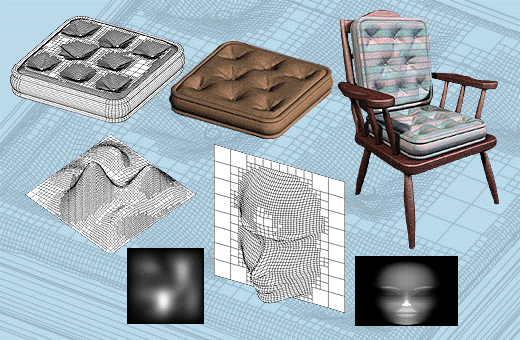
Displacements are derived by mapping images on surfaces, just like the textures. They create a mesh corresponding to the shades in the image, with the points displaced, to produce amazingly accurate sculpted surfaces. This tool turns a sphere into a human head, a rectangular extrusion into a pillow, and a flat site into a terrain model, to mention just a few of the possibilities.


form·Z feature list

Introduction


Interface


Modeling

• Primitives
• Spherical objects
• Metaballs
• 3D solids and 2D shapes
• Patterned polygons
• Derivative surfaces, extrusions, enclosures
• Parallel objects
• Frames

• Projection objects
• Unfolding
• Terrain models
• Revolved objects
• Helixes
• Screws and bolts
• Stairs
• Sweeps
• Draft Sweeps
• Skinning
• Lofting
• S-lofts
• Meshed objects
• Subdivisions
• Moving and disturbing meshes
• Deformations
• Bending along curves
• Morphing
• Image based displacements
• Rounding
• Blending and filleting
• Draft angles
• Splines and c-curves
• C-Meshes
• Nurbz
• Formula curves and surfaces
• Patches
• Boolean operations
• Trimming, splitting, and stitching
• 2D and 3D sections
• Deriving contours
• Lines of intersection
• Grouping and ungrouping/Joining and separating
• Placing and editing text
• Symbols
• Editing 3D lines
• Converting representations of objects
• Extracting controls
• Inquiring and measuring
• Repairing objects and projects
• Moving, rotating, resizing, and mirroring
• Clones
• Attaching
• Replace
• Inserting
• Deleting

Drafting


Rendering


Special features

• Extensive import/export
• Panoramic views
• Straight up perspectives
• View matching
• Walk through animation
• Rapid prototyping
• 2D/3D digitizing

next »